
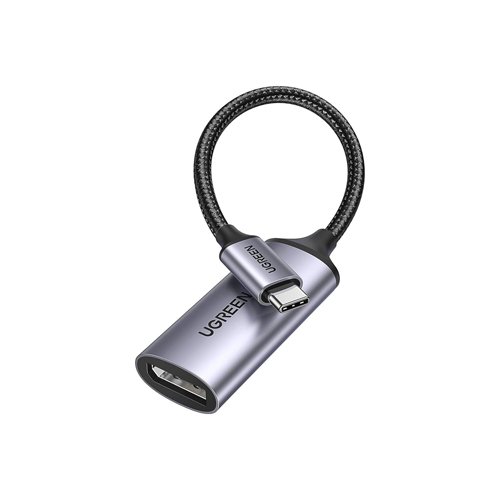
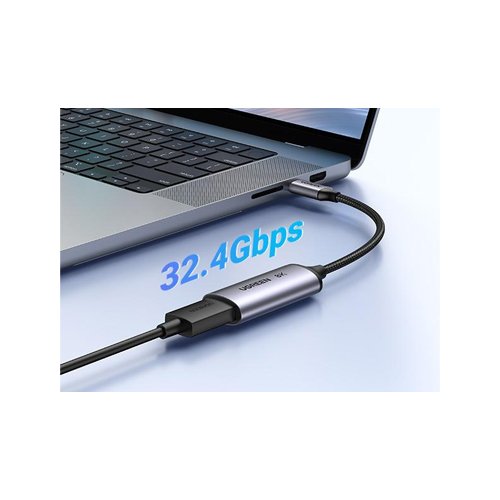
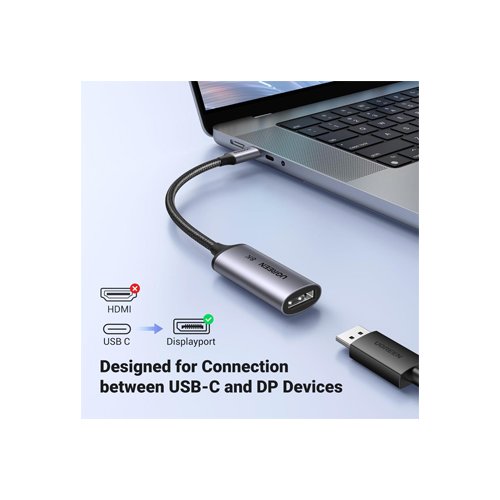

The UGREEN CM654 (15575) USB-C to DisplayPort 1.4 Adapter connects compatible USB-C laptops, tablets and smartphones to DisplayPort monitors. With support for up to 8K resolution at 60Hz, it provides detailed visuals for professional work, entertainment and external display setups.
Top Highlights
- 8K@60HzDetailed Ultra HD visuals.
- DisplayPort 1.4Up to 32.4Gbps bandwidth.
- HDR SupportEnhanced display contrast.
- USB-C to DPExternal monitor connection.
About the UGREEN CM654 (15575)
The UGREEN CM654 is a USB-C male to DisplayPort 1.4 female video adapter for compatible USB-C devices supporting DisplayPort Alt Mode or Thunderbolt video output. It supports up to 8K@60Hz and high-refresh-rate lower-resolution modes, with a maximum DisplayPort 1.4 link bandwidth of 32.4Gbps. The adapter supports HDR and audio transmission through compatible DisplayPort equipment. Its aluminum-alloy housing, braided nylon cable and plug-and-play design make it suitable for portable and desktop display setups.
Design & Performance
8K Ultra HD Resolution at 60Hz
The UGREEN CM654 supports a maximum published video resolution of 7680 × 4320 at 60Hz on compatible source devices and monitors. This high-resolution output is useful for detailed visual work, large-screen content and advanced workstation displays.
Achieving 8K@60Hz requires a suitable USB-C video source, DisplayPort cable, monitor and supported display configuration. Actual available modes depend on the complete connection, including bandwidth and compression capabilities.
DisplayPort 1.4 with 32.4Gbps Bandwidth
The adapter uses DisplayPort 1.4 technology with a maximum four-lane link rate of 32.4Gbps. This provides the signaling capacity needed for demanding video modes when the connected computer and monitor support the required DisplayPort features.
The 32.4Gbps figure describes DisplayPort link bandwidth, not USB file-transfer speed. The adapter is designed for video output rather than USB data transfer, charging or peripheral expansion.
High Refresh Rates for Compatible Monitors
Beyond 8K output, the UGREEN CM654 supports high-refresh-rate display configurations, with regional product specifications listing up to 4K@240Hz and 2K@240Hz under suitable conditions. This makes it relevant for users connecting compatible high-refresh gaming or professional monitors.
Maximum refresh rates are dependent on the source GPU, display, cable, color settings and available bandwidth. Higher-resolution or high-refresh modes may require Display Stream Compression or other supported display capabilities.
HDR and DisplayPort Audio Transmission
The CM654 supports HDR video output on compatible source and display hardware, allowing HDR content to be presented with the contrast and color range supported by the monitor. It also carries supported digital audio signals through DisplayPort.
HDR quality and audio-format availability depend on the operating system, graphics hardware, connected monitor and content. The adapter itself does not upgrade an SDR monitor to HDR or add audio features that the connected equipment does not support.
Extend or Mirror an External Display
Connect a compatible laptop or other USB-C video source to a DisplayPort monitor for a larger workspace. Supported systems can mirror the primary screen for presentations or extend the desktop for multitasking across two displays.
The CM654 provides one DisplayPort output. Multi-monitor expansion through a single adapter is not guaranteed and depends on the host’s supported display configuration. The USB-C source must support DisplayPort Alt Mode or a compatible Thunderbolt video connection.
Aluminum Housing and Braided Cable Design
The UGREEN CM654 features an aluminum-alloy adapter housing and braided nylon cable designed for regular handling. Its compact construction is convenient for workstations, meeting rooms and travel setups where a USB-C computer needs to connect to a DisplayPort display.
The adapter works without a separate driver on supported devices. Connect the USB-C male plug to the video-capable host, attach a suitable DisplayPort cable to the female socket and connect the other end to the monitor’s DisplayPort input.
Who It’s For
Creative Professionals: Connect compatible high-resolution displays for editing and design work. Office Users: Extend laptop desktops for multitasking. Gamers: Use supported high-refresh DisplayPort monitors. MacBook and Laptop Users: Connect USB-C video outputs to DisplayPort screens. Presenters: Mirror compatible computer displays for meetings. Home Users: Enjoy high-resolution video on supported external monitors.
Connect compatible USB-C devices to high-resolution DisplayPort monitors with DP 1.4 technology.
UGREEN USB C TO DP 8K CONVERTER CM654(15575) Features
- Plug and Play: Designed for easy and hassle-free use, often requiring no additional drivers for basic functionality.
- USB-C Compatibility: Works with devices equipped with USB Type-C ports, offering versatility for a wide range of modern devices.
- DisplayPort Compatibility: Compatible with DisplayPort-enabled monitors, projectors, or other display devices.
- High-Quality Materials: Constructed with durable and high-quality materials for long-lasting performance.
- Compact Design: Compact and portable design for easy transportation and use on the go.
- Stable Connection: Ensures a stable and reliable connection between your USB-C device and DisplayPort display.
- Audio Support: Some converters may also support audio transmission, allowing you to transmit both video and audio signals through the DisplayPort.
- Wide Device Compatibility: Designed to work with various devices, including laptops, desktops, tablets, and smartphones with USB-C ports.
- Multi-Monitor Setup: Some converters support multi-monitor setups, allowing you to extend or mirror your display across multiple monitors.
- Energy Efficiency: Energy-efficient design to minimize power consumption during operation.
Based on 0 reviews
Only logged in customers who have purchased this product may leave a review.




There are no reviews yet.