

The UGREEN CM513 (50945) VGA to HDMI Converter connects compatible VGA computers to HDMI monitors, televisions and projectors. It converts analog VGA video into a digital HDMI signal with Full HD resolution up to 1080p@60Hz, making older computer equipment useful with modern displays.
Top Highlights
- 1080p@60HzFull HD video output.
- VGA to HDMIActive signal conversion.
- 3.5mm AudioSound through HDMI.
- USB-C PowerPowered conversion.
About the UGREEN CM513 (50945)
The UGREEN CM513 (50945) is an active VGA male to HDMI female converter designed to connect compatible analog VGA video sources to digital HDMI displays. It supports video resolution up to 1920 × 1080 at 60Hz and features a 3.5mm stereo audio input for combining sound with the HDMI output. A USB-C 5V/1A power connection supplies the converter’s electronics. Its compact black PC+ABS housing and 15cm integrated cable make it practical for everyday display connectivity.
Design & Performance
Active VGA to HDMI Signal Conversion
The UGREEN CM513 converts an analog VGA signal from a computer or compatible source into a digital HDMI signal for an external monitor, television or projector. This makes it useful when an older desktop or laptop has VGA output but the intended display accepts HDMI input.
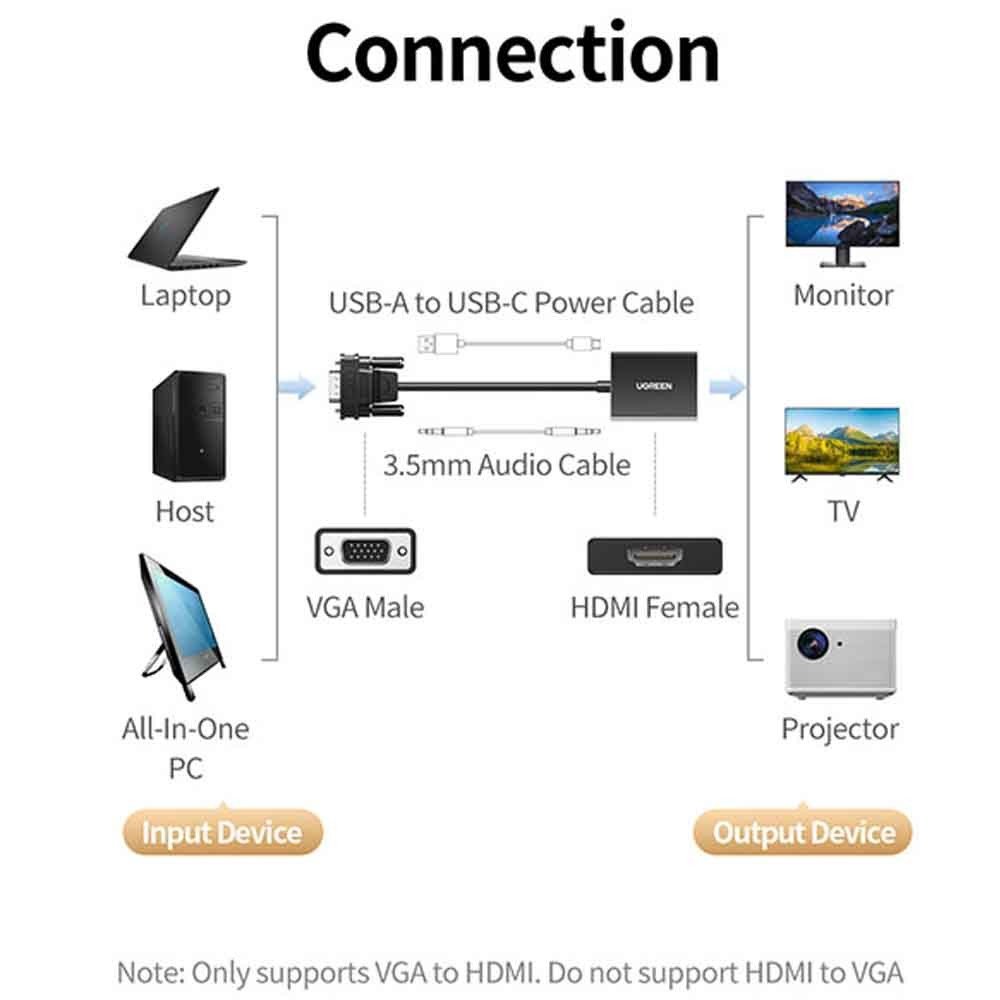
The conversion is strictly one-way, from VGA to HDMI. It cannot be reversed to connect an HDMI computer to a VGA monitor, and it does not convert signals from DisplayPort or USB-C video outputs.
Full HD 1080p Video at 60Hz
The converter supports output resolutions up to 1920 × 1080 at 60Hz, providing Full HD video for presentations, documents, spreadsheets, web browsing and multimedia viewing. Lower resolutions can also be used when supported by the source computer and HDMI display.
Actual output quality depends on the VGA signal, selected resolution, cable quality and display capabilities. The CM513 does not provide native 4K output or increase the original resolution of the connected source.
3.5mm Audio Input with HDMI Output
Because VGA carries video only, the CM513 includes a separate 3.5mm stereo audio input. Connecting the source computer’s analog audio output allows the converter to combine sound with the digital HDMI signal for playback through a compatible HDMI television, monitor or projector.
For audio operation, connect the source’s headphone or line-out port to the converter’s 3.5mm input. The receiving HDMI device must also support audio playback or audio output through connected speakers.
USB-C 5V/1A Power Connection
The active conversion circuitry requires power through its USB-C power input, rated at 5V/1A. This connection supplies the electricity needed to convert VGA video and combine the optional analog audio signal into HDMI output.
Use a suitable USB power source and cable during operation. The USB-C connector is dedicated to power; it does not provide USB data transfer, USB-C video input or laptop Power Delivery charging.
Compact 15cm Cable and Durable Housing
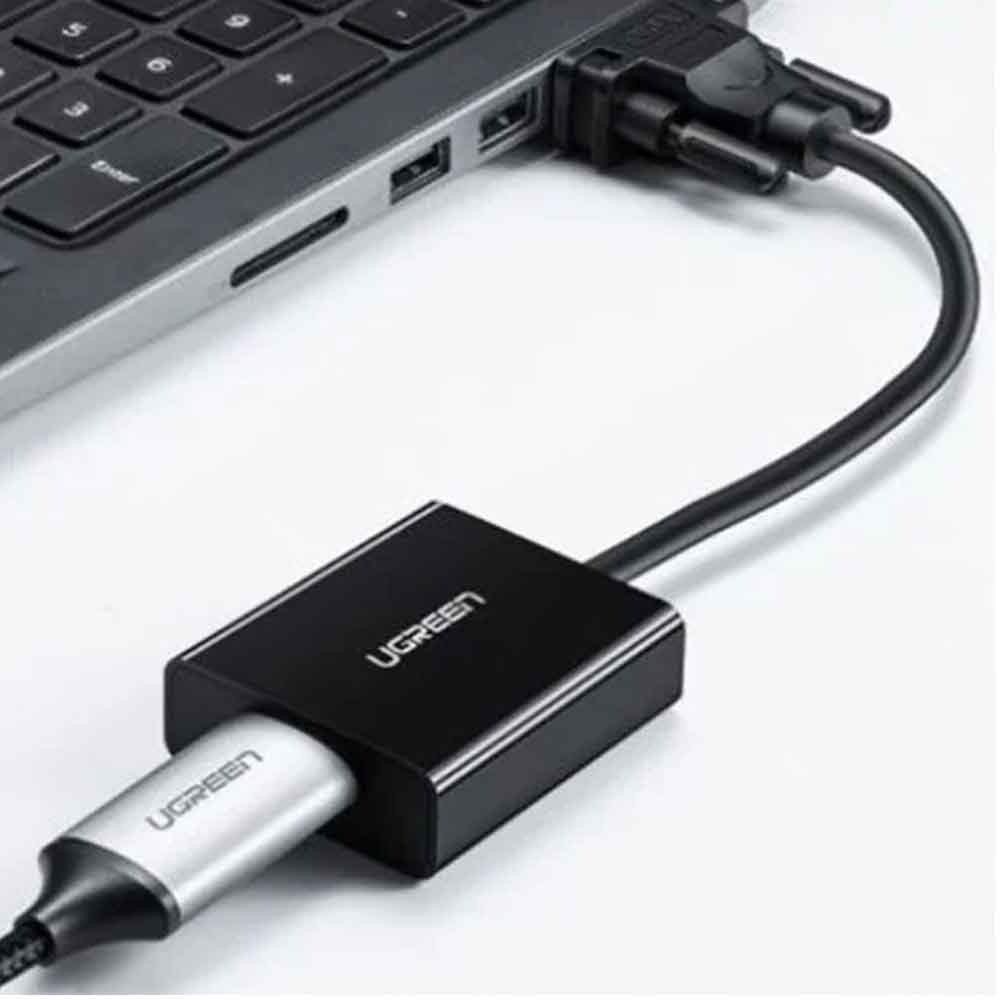
The UGREEN CM513 has a short 15cm integrated VGA connection and a compact converter body measuring approximately 45.5 × 36 × 10mm. This design keeps the adapter close to the source device while allowing a separate HDMI cable to reach the display.
Its black PC+ABS housing provides a lightweight, practical enclosure for regular desktop and portable use. The converter can be carried with computer accessories for use in meeting rooms, classrooms and temporary display installations.
Plug-and-Play Setup for Older Computers
The CM513 is designed for plug-and-play operation with compatible VGA video sources and HDMI displays. Connect the VGA male plug to the source, attach an HDMI cable to the output, supply USB-C power and connect the optional 3.5mm audio cable when sound is required.
The converter does not require a dedicated adapter driver on supported systems. Mirror or extend display modes depend on the source computer’s graphics capabilities and operating system settings. This adapter does not support reverse HDMI-to-VGA conversion.
Who It’s For
Desktop Computer Users: Connect VGA-equipped computers to modern HDMI monitors. Office Professionals: Use existing VGA computers with meeting-room displays. Teachers and Students: Connect older classroom computers to HDMI projectors. IT Technicians: Maintain compatibility between older computer equipment and newer displays. Home Users: Connect compatible VGA laptops or PCs to HDMI televisions. Presentation Users: Display slides and videos on supported HDMI screens with optional audio.
Connect older VGA computers to modern HDMI displays with Full HD video and optional audio support.
| Product Specifications | |
|---|---|
| Tech Specs | Product Type |
| Input Connector | VGA Male |
| Output Connector | HDMI Female |
| Audio Input | 3.5mm Stereo |
| Power Input | USB-C, 5V/1A |
| Maximum Resolution | 1920 × 1080 |
| Maximum Refresh Rate | 60Hz |
| Audio Sampling Rates | 32kHz / 44.1kHz / 48kHz |
| Audio Bit Depth | Up to 24-bit |
| Signal Direction | VGA to HDMI Only |
| Cable Length | 15cm (Integrated VGA Lead) |
| Dimensions | 45.5 × 36 × 10mm |
| Material | PC + ABS |
| Color | Black |
| Operating Systems | Windows, macOS, Linux |
| Installation | Plug and Play |
| EDID Support | Not Supported |
| Warranty Information | |
| Warranty | N/A |
Based on 0 reviews
Only logged in customers who have purchased this product may leave a review.



There are no reviews yet.